Skip to content
View in the app

A better way to browse. Learn more.

Espacio Profundo

A full-screen app on your home screen with push notifications, badges and more.

To install this app on iOS and iPadOS
  1. Tap the Share icon in Safari
  2. Scroll the menu and tap Add to Home Screen.
  3. Tap Add in the top-right corner.
To install this app on Android
  1. Tap the 3-dot menu (⋮) in the top-right corner of the browser.
  2. Tap Add to Home screen or Install app.
  3. Confirm by tapping Install.
HERRAMIENTAS DE LA COMUNIDAD Gratuito

Simulá tu equipo y planificá la noche en Tuniverso

Calculá el campo visual (FOV) de tu telescopio y cámara o armá tu lista de objetos para observar hoy.

Caldwell 100 (Running Chicken Nebula)

Featured Replies

Publicado
  • Esta es una publicación popular

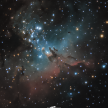
Buenas! Comparto mi foto (invertida, me gusta más en esa orientación) de Caldwell 100/IC 2944 o como algunos la llaman, Nebulosa del Pollo Corredor, la foto es un apilado de 220 fotos de 1', dando un total de 3 horas 40 minutos. Tomada desde los contaminados cielos de Buenos Aires (Burzaco, bortle 9) con una Canon 7D Mark II sin modificar, un Skywatcher Esprit 100, una EQ6-R Pro, y la gran ayuda del Optolong UHC. Procesado en Pixinsight y Photoshop CC 2020. Dadas las limitaciones que me impone el cielo, la cámara y las restricciones de luz del filtro, estoy más que conforme con el resultado!


C100_horizontal.thumb.png.1a8b60e5d125c288ae4da04ea98c1ec9.png


Un close up a los glóbulos de Bok:
C100_bokglobules.thumb.png.df5554a8501a022a7338b34580476848.png


Publicado

Una belleza.

Publicado

Espectacular. Me encantan los colores.

Publicado

Excelente !. 

Saludos


Publicado

Muy muy buena! excelentes colores y detalles!!

Crear una cuenta o conéctate para comentar

Account

Navigation

Buscar

Buscar

Configure browser push notifications

Chrome (Android)
  1. Tap the lock icon next to the address bar.
  2. Tap Permissions → Notifications.
  3. Adjust your preference.
Chrome (Desktop)
  1. Click the padlock icon in the address bar.
  2. Select Site settings.
  3. Find Notifications and adjust your preference.



