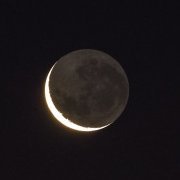
Publicado 4 de Agosto del 201511 a Hola: Por suerte, el viernes se despejó. Es una sola toma con el SW 203/1200 DOB, Canon 60D a foco primario, ISO 100 - 1/1250s - WB, retocada con el Camera RAW del PS. Gracias a EP por el espacio.
Publicado 4 de Agosto del 201511 a Pucha que buenas lunares que estás logrando che, te felicito. Los cráteres hacen que esos bordes se vean espectaculares
Publicado 4 de Agosto del 201511 a Yo de astrofotografía cero , pero esa foto está espectacular !!! Saludos
Publicado 4 de Agosto del 201511 a Muy buena Daniel, me encanta el contraste que le diste. Saludos Antes de consultar algo, presentate aca: https://www.espacioprofundo.com.ar/forum/11-club-social-espacio-profundo/ Guias para iniciados: https://www.espacioprofundo.com.ar/topic/32428-normas-del-foro-que-telescopio-comprar-preguntas-y-respuestas/ Tambien podes usar el buscador: https://www.espacioprofundo.com.ar/search/






Crear una cuenta o conéctate para comentar